


Choosing a dive computer is an important decision, especially when you are buying your first one. There are many models available, with different designs, displays, features and prices. But which one is right for you?
I completed my first Open Water Diver course in 1993 and graduated from a professional diving college in Canada in 2000. I have been working as a diving instructor ever since. Today, I am the owner and instructor at Diving Center Sozopol.
The following advice is based on my personal and professional experience. It is intended mainly for divers considering the purchase of their first dive computer. Experienced divers probably already have their own preferences, but they may still find some useful tips here.
Watch Style or Large Display?
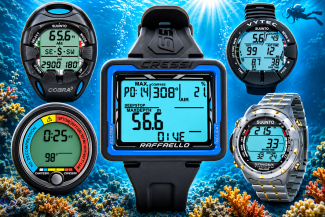
Dive computers come in different shapes and sizes. Some look like ordinary wristwatches, while others have large round or rectangular displays.
Over the past 33 years, I have owned and used dive computers with different designs and types of displays.
If you want a compact dive computer that you can also wear as an everyday watch, you will generally need to budget more for its compact design and additional features. Underwater, however, information on a larger display is often easier to read.
Many modern dive computers also allow you to transfer your dive data to a smartphone or computer.
Large round displays can offer excellent visibility. Personally, I prefer a large rectangular display. What matters most is being able to read essential information quickly and without difficulty underwater — depth, dive time, no-decompression limit, ascent information and safety stop details.
Rechargeable or Replaceable Battery?
This is one of the questions I would encourage you to consider before buying a dive computer.
Many modern models use built-in rechargeable batteries that can be charged with a cable or a dedicated charging station. This is convenient because you do not need to buy replacement batteries regularly.
However, rechargeable batteries have a limited service life. After several years, their capacity may decrease significantly, and some dive computers must be sent to an authorized service center for battery replacement.
This can involve additional costs and a period when you are without your computer.
Other dive computers use replaceable batteries. Some models allow you to replace the battery yourself, while others require professional servicing to maintain their watertight integrity.
For certain models, the replacement battery itself may cost approximately €3–6, although the total cost depends on the design and servicing requirements.
Before buying, check how the battery is replaced, how much the procedure costs and whether authorized servicing is required.
Do You Need Air Integration?
Some dive computers can receive cylinder-pressure information through a wireless transmitter attached to a high-pressure port on the regulator's first stage.
This feature is called Air Integration.
It allows you to see your cylinder pressure directly on the dive computer's display.
Some models support multiple transmitters, which can be useful for particular equipment configurations. However, many recreational divers do not need this capability, and it increases the overall cost.
Many air-integrated dive computers can also calculate an approximate remaining gas time based on your current depth, cylinder pressure and breathing gas consumption rate. In simple terms, the computer calculates how long your available gas might last if you remain at approximately the same depth and continue breathing at a similar rate.
This information can be useful, but it does not replace proper dive planning, monitoring cylinder pressure and maintaining the required gas reserves.
There are also hose-integrated dive computers. These connect to the regulator's first stage through a high-pressure hose and can replace the traditional analog pressure gauge.
I have owned a wireless air-integrated dive computer for more than 15 years. Even so, I rarely use the air-integration feature today.
For my everyday diving, I prefer a simpler wrist-mounted computer and monitor my cylinder pressure with a conventional pressure gauge.
This is a personal preference, not a criticism of air-integrated computers.
What Do I Personally Look for in a Dive Computer?
As a diving instructor, I carry out different types of dives — training dives, introductory dives, guided dives with certified divers and occasionally professional underwater work.
On some days, I may complete up to five dives. Many are relatively shallow, but when making repetitive dives, carefully monitoring no-decompression limits is especially important.
My main preferences are:
- A wrist-mounted dive computer.
- A large, easy-to-read rectangular display.
- Nitrox capability.
- A built-in compass.
- Several levels of adjustable personal conservatism.
- A good backlight.
- Comfortable buttons that can be operated while wearing gloves.
- A suitable strap for different types of exposure suits.
This does not mean every diver needs the same features. The important thing is to choose a computer that suits your own diving activities and future plans.
Choose a Nitrox-Capable Dive Computer
Even if you currently dive only with ordinary air, I would recommend choosing a dive computer that supports Nitrox.
You may not need this feature today, but it could be useful in the future if you decide to complete a Nitrox diving course.
There is also a practical detail worth considering.
Some dive computers restrict switching between Air and Nitrox modes during a series of repetitive dives.
For computers that do not allow switching between Air and Nitrox during repetitive dives, one practical solution is to use Nitrox mode with the oxygen concentration set to 21% when diving with ordinary air. The computer will then perform its calculations using that oxygen concentration.
If your next cylinder contains Nitrox, you can enter the actual oxygen percentage determined by analyzing the gas mixture before the dive, provided that your particular model allows this setting to be changed between dives.
Always follow the manufacturer's instructions and personally verify the oxygen content of your cylinder.
Built-In Compass, Backlight and Buttons
A built-in compass is a feature I personally find very useful.
Different dive computers display compass information in different ways. Some show a graphical direction indicator similar to a traditional compass, while others use compass directions such as N, NE or NNE, or a numerical heading in degrees, for example 126°.
Which display is most convenient depends on your preferences and how easily you can read the information underwater.
A good backlight is also important, particularly during night dives, deeper dives or in reduced visibility.
Pay attention to the buttons as well. They should be comfortable to operate, including when wearing thick neoprene gloves.
One Button or Several?
Some dive computers are operated using just one button.
On certain single-button models, moving between screens or changing settings requires a sequence of short and long button presses. This can make navigating menus and adjusting settings more difficult and less convenient.
Personally, I prefer computers with several buttons, where different functions are easier to access.
That does not mean single-button computers are bad. It simply means that the way a computer is operated is something worth trying before you buy it.
Don't Forget the Strap
The strap may seem like a minor detail, but it can become surprisingly important.
If you dive only in a thin wetsuit, the standard strap will probably be long enough.
However, when wearing a thick wetsuit or a drysuit, the circumference around your wrist can increase significantly.
Before buying, check whether the strap is long enough and whether the manufacturer offers an extension or an alternative attachment system.
Final Thoughts
Do not choose your dive computer based only on price, appearance or the number of features.
Think about the types of dives you do today and the diving you may want to do in the future.
For me, the most important things are clear information, convenient operation and a computer that meets my actual needs.
A good dive computer is an important safety tool, but it never replaces proper training, dive planning and sound diving judgment.
Try Before You Buy — Test a Dive Computer Underwater
Choosing a dive computer based only on photographs, technical specifications or a demonstration in a shop is not always easy.
Looking at a display on land is one thing. Using the computer during a real dive is something quite different.
At Diving Center Sozopol, we offer you the opportunity to test a Cressi dive computer underwater before deciding whether to buy one.
I personally use Cressi dive computers and am very satisfied with them. Diving Center Sozopol is an authorized Cressi distributor.
A Dedicated Dive Computer Training & Test Dive
This is not an ordinary guided recreational dive to a particular underwater attraction.
We offer a dedicated Dive Computer Training & Test Dive, where the main purpose is to become familiar with the device and try it in real diving conditions.
Before entering the water, we will go through the computer's main functions and settings.
During the dive, you will be able to experience:
- How easy the display is to read underwater.
- Whether the size and layout of the information suit you.
- How the buttons operate.
- How to use the built-in compass.
- How the computer displays the no-decompression limit and safety stop information.
You will be accompanied by an instructor throughout the dive.
Complimentary Test Dive with Purchase
If you decide to purchase a Cressi dive computer after your test dive, the Dive Computer Training & Test Dive is complimentary.
If you decide not to purchase a computer, you simply pay the regular price for the Training & Test Dive.
There is no obligation to buy.
You Receive a Brand-New Computer
If you decide to purchase a dive computer after your Training & Test Dive, you will receive a brand-new Cressi dive computer, supplied through Cressi Bulgaria, subject to availability of your chosen model.
As an authorized Cressi distributor, Diving Center Sozopol also offers selected Cressi dive computers for purchase directly at the diving center, subject to current stock availability.
Help with Initial Setup
When you purchase a computer, we will help you with its initial setup and explain how to use its main functions.
Our goal is to help you start using your new equipment confidently and understand the information it provides.
Diving Center Sozopol — Try Before You Buy.